
- Quick Start Guide
- Signing Up & Creating Your Account
- SureFeedback Cloud Setup & Workflow Guide
- Plugin Set Up Guide
- How to Connect a WordPress Site – Manual Setup
- How to Connect a Non-WordPress Site
- How to Connect a WordPress Site – Automatic Setup
- Site Verification & Troubleshooting
- What Are Roles in SureFeedback Cloud?
- How to Invite Team Members & Clients
- Understanding Organizations (and How to Create One)
- How to Add Comments on Your Site After Successful Connection
- How to Use Private Comments
Understanding Organizations (and How to Create One)
What is an Organization?
In SureFeedback Cloud, an Organization is the top-level account that contains everything you manage.
Think of an organization as the main container for your work. Inside it, you can create Workspaces, add Sites, manage Tasks, and invite team members or clients.
All activity in SureFeedback happens inside an organization.
For example:
| Organization | Workspaces | Sites |
| Design Agency | Client A | clientA.com |
| Design Agency | Client B | clientB.com |
| Product Team | Marketing | landingpage.com |
This structure keeps projects organized and makes it easier to manage teams, clients, and permissions.
How Organizations Work
Inside an organization you can:
- Create and manage multiple workspaces
- Add and manage sites
- Invite team members or clients
- Assign roles and permissions
- Manage tasks and feedback
- Track activity across projects
All workspaces and sites belong to an organization.
When Should You Create Multiple Organizations?
Most users only need one organization, but multiple organizations can be useful if you want to completely separate environments.
For example:
- One organization for agency clients
- One organization for internal projects
- One organization for a different company or brand
Each organization has its own members, workspaces, and sites.
How to Create an Organization
When you create your SureFeedback Cloud account, your first organization is created automatically.
If you want to create another organization:
- Click your profile avatar in the top navigation
- Select Switch Organization
- Click Create Organization
- Enter your organization name
- Confirm creation
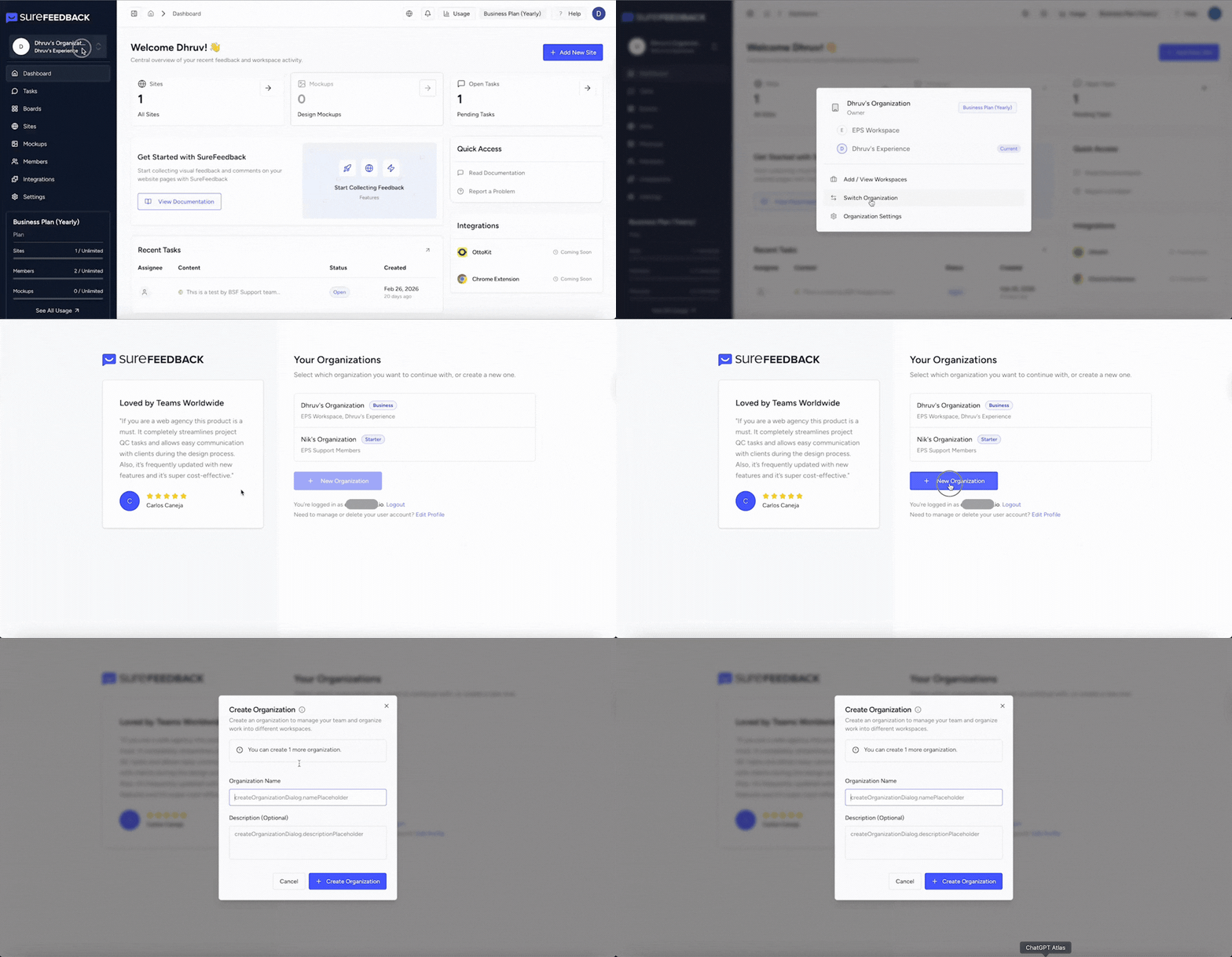
Your new organization will now be available in the organization switcher.
You can switch between organizations anytime.
Switching Between Organizations
If you belong to multiple organizations, you can easily switch between them.
- Click your profile avatar
- Select Switch Organization
- Choose the organization you want to access
Your dashboard will update instantly to show the workspaces and sites within that organization.
Best Practices for Organizations
To keep things simple and organized:
- Most users should use one organization
- Use workspaces to separate clients or projects
- Only create multiple organizations if you need full separation
This structure keeps your workflow clean while still giving you flexibility as your projects grow.
We don't respond to the article feedback, we use it to improve our support content.